
In-Game Widget
In Game Widget (IGW) for game providers and aggregators to display tournaments with a single script tag. The Unibo Widget is a self contained JavaScript file with zero dependencies.
Unibo IGW currently only works for logged in players.
Prerequisites
Unibo-provided CDN JavaScript URL e.g.
https://<brand-name>.widgets.unibo.io/in-game/widget.jsYour site can run JavaScript
Your site can set user cookies (or render
data-*attributes — see below)
Quick Start
<!-- 1. Mark your existing game container -->
<div id="my-game" data-unibo-gameframe>
  <!-- your game canvas / iframe wrapper -->
</div>

<!-- 2. Set player cookies -->
<script>
  document.cookie = "unibo_userId=player_123; path=/";
  document.cookie = "unibo_registrationDate=2023-07-30T00:00:00+00:00; path=/";
  document.cookie = "unibo_language=en; path=/";
</script>

<!-- 3. Load the widget -->
<script src="https://<brand-name>.widgets.unibo.io/in-game/widget.js"></script>
That's it. The widget auto-initialises, mounts the trigger button and notifications inside the marked container, and handles everything else.
Marking the gameframe
The widget needs to know which element wraps your game so it can mount the overlay button (and notifications) inside it. Add the data-unibo-gameframe attribute to that element:
<div id="anything-you-already-use" data-unibo-gameframe>
  <!-- game -->
</div>
Requirements
Must accept children —
<div>,<section>,<main>, etc. Not void elements (<img>,<input>,<canvas>) or<iframe>elements.Must be a block-level element with a visible size — inline elements won't size the overlay correctly.
Position is handled for you — the script applies
position: relativeif your element isposition: static, so the overlay anchors correctly.
iframes: if your game runs inside an
<iframe>, mark the iframe's parent container, not the iframe element itself. Cross-origin iframe content can't be reached from outside.
In Game Widget (IGW) for game providers and aggregators to display tournaments with a single script tag. The Unibo Widget is a self contained JavaScript file with zero dependencies.
Note: Unibo IGW currently only works for logged in players.
Authentication
Set two cookies and the widget authenticates automatically with the Unibo services.
Required cookies
Cookie | Example | Purpose |
|---|---|---|
|
| Player's unique identifier |
|
| Player's registration date |
Accepted date formats for unibo_registrationDate
Format | Example |
|---|---|
ISO 8601 |
|
Unix ts (seconds) |
|
Unix ts (milliseconds) |
|
Configuration cookies
Set these to control language and currency display within the widget.
Cookie | Required | Example | Purpose |
|---|---|---|---|
| No |
| 2-letter language code |
| Multi-currency setup |
| Currency code for prize display |
Note:
unibo_currencyis only required for providers with a multi-currency setup where a player can have more than one account currency.
Alternative to cookies: data attributes
You can provide auth/config values directly on the gameframe element using data-* attributes. If present, the widget reads these values as a fallback when cookies are not set.
<div
  id="my-game"
  data-unibo-gameframe
  data-user-id="player_123"
  data-registration-date="2023-07-30T00:00:00+00:00"
  data-language="en"
>
  <!-- game -->
</div>

<script src="https://<brand-name>.widgets.unibo.io/in-game/widget.js"></script>
Supported attributes
Attribute | Required | Example | Purpose |
|---|---|---|---|
| Yes |
| Player unique identifier |
| Yes |
| Player registration date |
| No |
| 2-letter language code |
Lookup priority
For each value the widget checks (in order):
unibo_*cookie (e.g.unibo_userId)Generic cookie (e.g.
userId)data-*on the gameframe element
The first non-empty value wins.
Notes
data-registration-dateaccepts the same formats asunibo_registrationDate(ISO 8601, unix seconds, unix milliseconds).data-languageis normalised to a lowercase 2-letter code.Cookies still take priority;
data-*attributes are a fallback for clients that prefer to render values into HTML rather than set cookies.
Key components
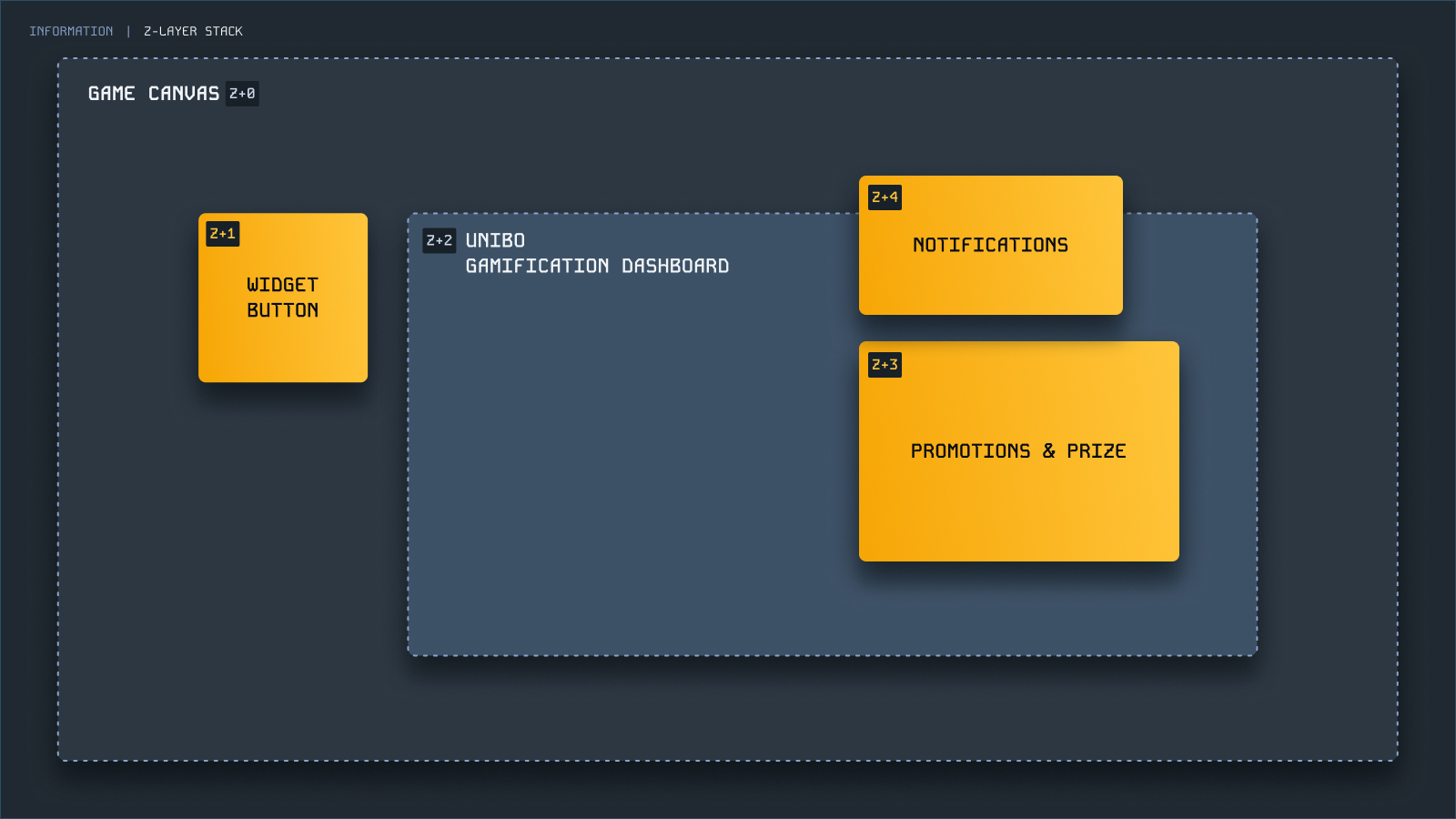
The In-Game Widget consists of two components — both auto-mounted by the script inside your gameframe. You do not need to add markup for either.
Button — the trigger users click to open the IGW modal showing progress, ongoing campaigns and finished campaigns.
Notifications — surfaces campaign progress, prize wins, and campaign completions to the player.
Full integration eample
HTML / JS
<!doctype html>
<html>
  <head>
    <title>Example</title>
  </head>
  <body>
    <main
      id="play-area"
      data-unibo-gameframe
      style="width: 100vw; height: 100vh;"
    >
      <!-- your game canvas / iframe wrapper -->
    </main>

    <script>
      document.cookie = "unibo_userId=player_123; path=/; Secure; SameSite=Lax";
      document.cookie = "unibo_registrationDate=1690675200; path=/; Secure; SameSite=Lax";
      document.cookie = "unibo_language=en; path=/; Secure; SameSite=Lax";
    </script>

    <script src="https://<brand-name>.widgets.unibo.io/in-game/widget.js"></script>
  </body>
</html>
React
// UniboWidget.jsx
import { useEffect, useRef } from "react";

const WIDGET_SCRIPT_URL =
  "https://<brand-name>.widgets.unibo.io/in-game/widget.js";

function setUniboCookies({ userId, registrationDate, language = "en", currency }) {
  const opts = "path=/; Secure; SameSite=Lax";
  document.cookie = `unibo_userId=${userId}; ${opts}`;
  document.cookie = `unibo_registrationDate=${registrationDate}; ${opts}`;
  document.cookie = `unibo_language=${language}; ${opts}`;
  if (currency) document.cookie = `unibo_currency=${currency}; ${opts}`;
}

export function UniboWidget({ userId, registrationDate, language, currency }) {
  const scriptLoaded = useRef(false);

  useEffect(() => {
    if (!userId || !registrationDate || scriptLoaded.current) return;

    setUniboCookies({ userId, registrationDate, language, currency });

    if (document.querySelector(`script[src="${WIDGET_SCRIPT_URL}"]`)) {
      scriptLoaded.current = true;
      return;
    }

    const script = document.createElement("script");
    script.src = WIDGET_SCRIPT_URL;
    script.async = true;
    document.body.appendChild(script);
    scriptLoaded.current = true;
  }, [userId, registrationDate, language, currency]);

  return null;
}

// GameLayout.jsx — mark your game container, the widget mounts inside it
export function GameLayout({ children }) {
  return (
    <main id="play-area" data-unibo-gameframe>
      {children}
    </main>
  );
}
Common issues
Symptom | Likely casue | Fix |
|---|---|---|
Nothing appears on the page | No element marked with | Add the attribute and verify the element has visible dimensions |
Button appears outside the game area | The marked element extends beyond the visible game area | Move |
Widget opens but is empty | Tenant configuration / auth hasn't completed | Verify your tenant config with Unibo |
User isn't recognised | No user ID in cookies and no | Set the cookie or attribute (section 4) |
Support
Contact your Unibo account manager or reach out to the integration team for help with your setup.