
In-Game Widget
Introduction
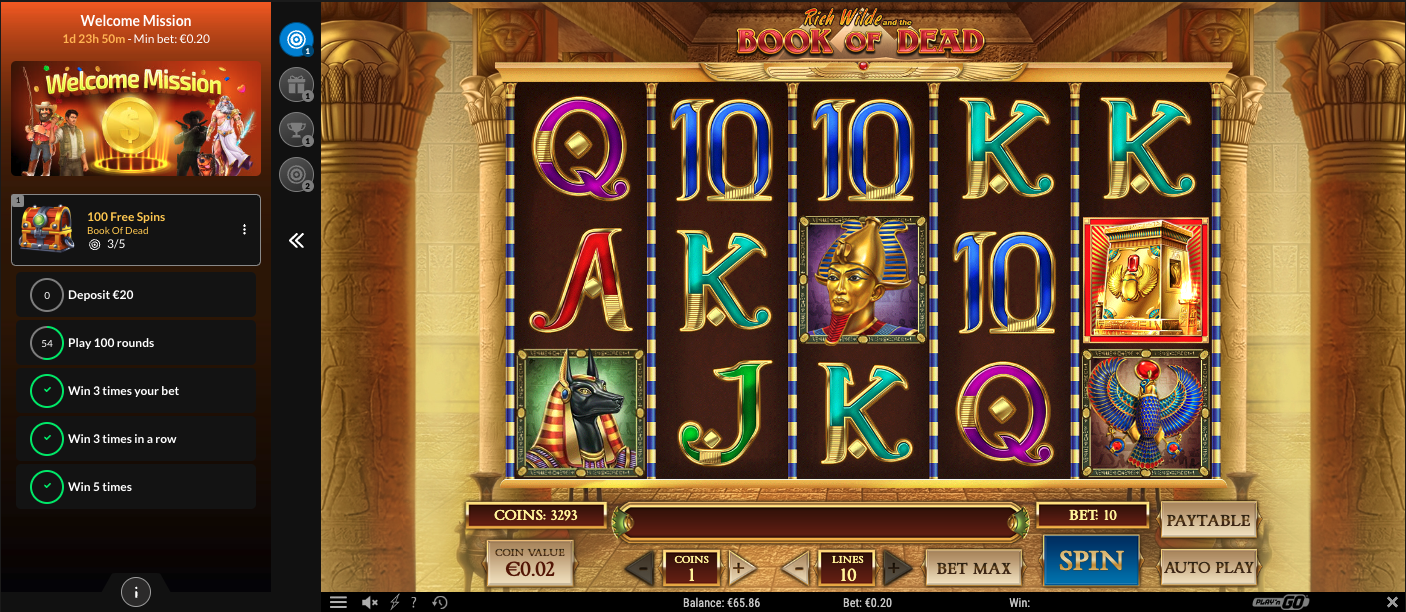
The In-Game Widget is a frontend component provided by Unibo that is rendered alongside the game. It displays active campaigns, player progress, and rewards in real time while the player is in a game session.
The In-Game widget is loaded and controlled by the platform and communicates directly with Unibo services. It does not replace or modify the game itself and does not interact with game provider logic.
Quickstart
<!-- 1. Container -->
<div id="unibo-overlay">
  <iframe id="game" src="https://your-game-host/..."></iframe>
</div>

<!-- 2. Cookies must be set before the script runs. -->
<script>
  document.cookie = "unibo_userId=StQ-1; path=/";
  document.cookie = "unibo_gameId=556655; path=/";
  document.cookie = "unibo_language=en; path=/";
  document.cookie = "unibo_registrationDate=1735689600; path=/";
</script>

<!-- 3. Load the overlay (given to you during the integration phase). -->
<script src="https://<unique-id>.cloudfront.net/main.js"></script>
<script>
  const overlay = UniboOverlay();
  overlay.init({ expand: true });
</script>
The container element must exist in the DOM before the overlay script runs and must not have any CSS applied to it.
Cookies
Set these on your domain before the overlay script runs.
Cookie | Required | Notes |
|---|---|---|
| yes | Stable player identifier — same value you stream in |
| yes | Unix timestamp in seconds, no decimals. Must match what Unibo has. |
| yes | ISO 639-1 code, e.g. |
| yes | Identifier of the game the player just opened. |
| conditional | Only on multi-currency platforms where display currency differs from the player's account currency. |
The reader accepts legacy non-prefixed names (userId, gameId,registrationDate) as a fallback. Use the unibo_* versions for new integrations.
Important cookie rules
Cookies must be set on a domain accessible to the widget
If the game is served over HTTP, cookies must not include the
Secureflag.Incorrect cookie configuration is one of the most common causes of widget initialisation failures.
Cookie timing requirement
All required cookies must be set before initialising the widget.
In-Game Widget placement (DOM contract)
The in-game widget is rendered alongside the game, not inside the game canvas.
Required DOM element
A container element with the id unibo-overlay must exist in the DOM before the overlay is initialised.
Example structure:
<div id="unibo-overlay">
  <iframe id="game"></iframe>
</div>
JavaScript API
UniboOverlay() returns a singleton instance. Calling it multiple
times always returns the same instance.
const overlay = UniboOverlay();

overlay.init({ expand: true });   // mount; expand=false starts collapsed
overlay.expand();                 // open programmatically
overlay.collapse();               // close programmatically
overlay.unmount();                // tear down — call on game session end
Lifecycle management
The widget lifecycle is controlled by the platform and follows three strict rules:
The widget must be initialised when a game session starts
The widget must be unmounted when the game session ends
A new widget instance must be created for each game launch
Unmounting the widget
Failing to call unmount() when the game session ends can result in multiple widget instances and undefined behaviour.
Unmounting must occur when:
The player exits the game
The game container is destroyed
The player navigates away from the game view
uniboOverlay.unmount();Device behaviour (implementation expectations)
This section describes expected behaviour to support correct integration and QA validation.
Desktop (expected behaviour)
The game remains visible while the widget is rendered alongside it
When the widget expands, the game may be pushed slightly to the side
The game and widget should remain visible without requiring page scroll
The widget and game should maintain equal height
Mobile (expected behaviour)
The widget supports both portrait and landscape orientations
Language changes on the site should be reflected in the widget
Reloading the page should reload the widget
Portrait:
The widget may partially widget the game when expanded
The widget should not push the game downward when collapsed
Landscape:
Expanding the widget may make the game window slightly tighter
If actual behaviour differs from the above, treat this as a QA mismatch and confirm with Unibo rather than adjusting based on assumptions.
Styling and visual reference
Styling and visual customisation are handled separately from the technical integration.
The in-game widget is styled to match the operator’s brand guidelines and is typically configured during the integration process. Visual examples and layout references are provided in separate styling documentation.
Error handling and resilience
During QA, test scenarios where the widget script fails to load (e.g. 404 or network failure).
In these cases:
The website and game must remain fully functional
No blocking errors should be thrown
The widget will simply not render