
How to Create a Progressive Mission Campaign
A Progressive Mission Campaign is a structured sequence of stages that unlock one after another. Players complete one stage to access the next.
The value is in the progression: it creates a clear path, keeps players engaged over time, and introduces increasing challenge without overwhelming them upfront.
Campaign Structure (Stages)
A Progressive Campaign is built using multiple stages.
Each stage = one mission campaign
Players only see one stage at a time
The next stage unlocks only after completing the previous one
Example Structure:
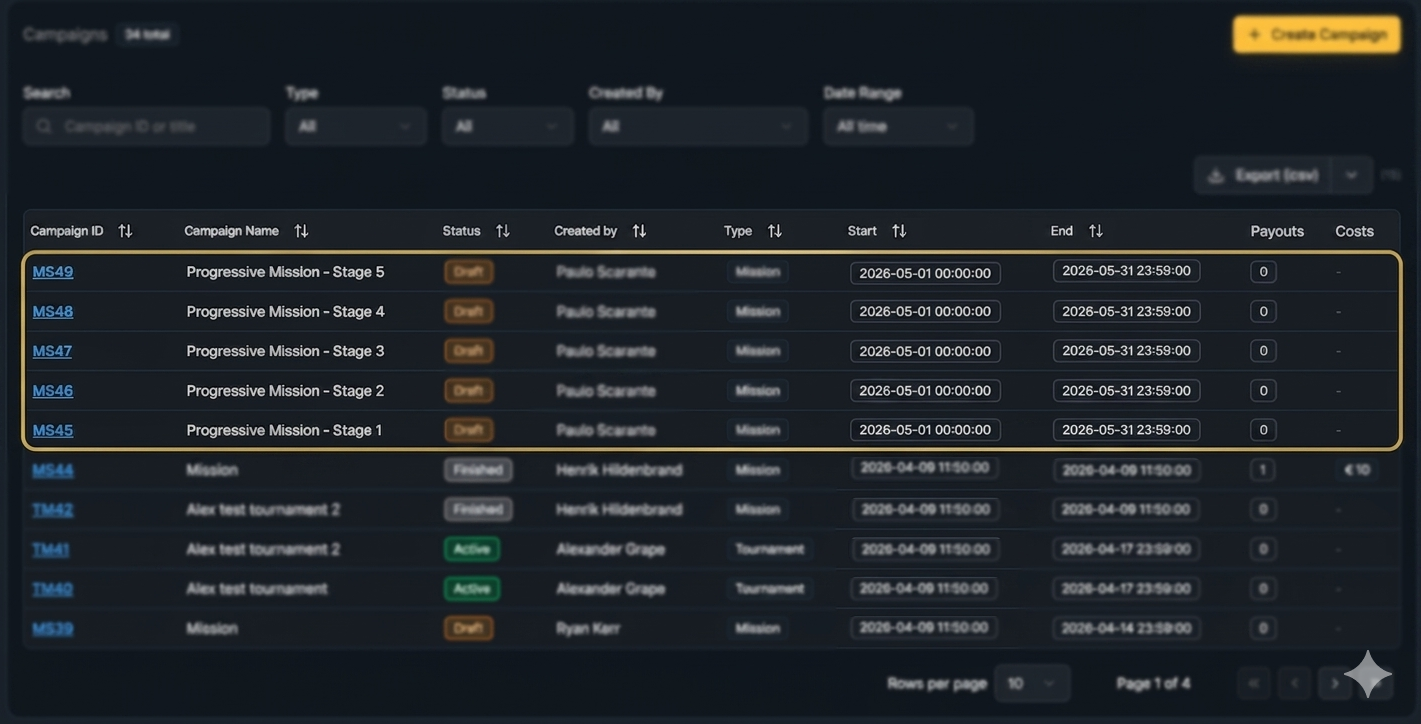
Stage 1 → Stage 2 → Stage 3 → Stage 4 → Stage 5
How progression works (player perspective)
Player enters Stage 1
Completes required missions/tasks
Stage 2 becomes available
Process repeats until the final stage
Design principle
Difficulty increases per stage
Rewards increase accordingly
Back Office Configuration
In the back office, each stage must be configured as a separate campaign.
Stage 1 setup
Go to Create New Campaign
Select Campaign Type: Mission
Set the Campaign Name (e.g. Progressive Mission - Stage 1)
Define the Campaign Period (e.g. 7 days / 10 days / monthly window)
Configure missions and tasks for Stage 1
In Player Selection, choose the target audience:
All Players, or
A predefined segment (e.g. VIP Players, High Rollers)
Finalize the rest of the campaign setup.
Save and publish the campaign
This campaign acts as the entry point of the progression flow.
Stage 2 setup
Create a new campaign and name it Progressive Mission - Stage 2, ensuring it uses the same campaign period as Stage 1
In Player Selection, add a filter and choose:
Based on Campaign
Select Progressive Mission - Stage 1
Select Completed
This ensures only players who completed Stage 1 enter Stage 2.
Repeat logic for all remaining stages
Stage 3 → Player Selection: Based on Campaign → Stage 2
Stage 4 → Player Selection: Based on Campaign → Stage 3
Stage 5 → Player Selection: Based on Campaign → Stage 4
Below is an example of how the campaign structure should be set up in the back office.
Best Practices
Keep the early stages easy to enter
Make progression feel achievable
Keep mission structure simple
Ensure rewards clearly increase per stage
Always validate from a player perspective before launch
Related Topics
For detailed steps on how to create a mission campaign, see How to Create a Mission Campaign.
More information about Objectives and Tasks for Mission Campaigns, see How to Define Objectives and Tasks for a Mission Campaign